
The useful question is what the whole job requires
Sigma’s October 23 announcement schedules the FP2 for November 11. That distinction matters: an announced camera and an available, independently characterized production tool are different buying situations. This is a decision guide before the scheduled launch, not a review of a camera we have tested.
Begin with one real deliverable: perhaps a seated interview, a handheld travel sequence or a product film with both landscape and portrait exports. Write down who operates the camera, where sound comes from, how footage reaches the editor and what must happen if a battery or recording device fails. Those constraints make a more useful shopping list than a collection of maximum specifications.
Our position is conditional. A modular camera deserves consideration when its configuration solves a particular problem with fewer compromises than an existing setup. It becomes less compelling when the equipment needed to make it usable recreates a larger camera, while adding connections, setup time and another workflow to maintain. The following comparisons are a way to investigate that trade, not a universal ranking.
Source notes: 1. Original editorial interpretation and hypothetical examples are identified in the text.
Read the recording envelope rather than combining maxima
Sigma lists a 24.5-megapixel partially stacked full-frame sensor, L-Mount, approximately 70GB of internal storage, UHS-II SDXC and USB-connected SSD recording. Its table lists 6K rates up to 59.94fps, but states a ProRes RAW and RAW HQ ceiling of 6K 29.97fps. A separate 47.95fps RAW footnote is not reconciled with that ceiling; we do not promise that higher-rate RAW combination. It also says 6K cannot be combined with electronic stabilization. These are manufacturer specifications, not our measurements.
Do not assemble a nonexistent mode by taking the highest number from each row. Record codec, aspect ratio, frame rate, destination and stabilization together on one line. The published aspect-ratio and frame-rate lists do not, by themselves, settle every possible combination. Ask for the exact supported configuration rather than assuming that a broad 6K capability guarantees your preferred open-gate RAW workflow.
The practical consequence is a different acceptance question for each job. A locked interview may prioritize a dependable long take and straightforward editing; a motion-heavy sequence may prioritize a particular frame rate and support arrangement. Neither choice is automatically more professional. A mode that fits the delivery and survives the complete workflow is worth more than a maximum that cannot be used with another essential setting.
Source notes: 2. Original editorial interpretation and hypothetical examples are identified in the text.
What the independent hands-on adds, and what it does not
Timothy Coleman’s October 23 TechRadar report is explicitly an early, not-yet-rated hands-on. He responds positively to handling, the tilting screen and the modular concept, while identifying absent in-body stabilization and the cost of accessories as trade-offs. Those are attributed impressions from his use, not Lumacta test results or a completed comparative lab review.
A useful way to read such coverage is to turn each impression into a question you can answer in a shop or rental. If handling sounds appealing, try the intended lens and grip configuration rather than the empty body. If an accessory sounds essential, add it to the quote before deciding whether the camera is good value. Keep the reviewer’s experience distinct from your own acceptance criteria.
We would still want repeatable production-camera evidence on difficult focus transitions, moving subjects, demanding lighting and sustained recording. An enthusiastic first experience does not supply all of that evidence, and the absence of those results here is not evidence of a defect. It is a reason to keep the conclusion provisional and to avoid committing an untested setup to a non-repeatable assignment.
Source notes: 4. Original editorial interpretation and hypothetical examples are identified in the text.
Open gate is a composition decision with a delivery cost
Consider an illustrative 6000-by-4000 canvas, not a claim about a particular FP2 recording mode. A full-width 16:9 crop would be 6000 by 3375; a full-height 9:16 crop would be 2250 by 4000. The second extraction keeps fewer horizontal pixels. This simple geometry explains why one capture can offer useful framing choices without providing unlimited resolution or making both compositions equally easy.
Place the subject, hands, captions and background action in both proposed frames during planning. A central subject may fit both crops, while a wide group or a sideways interaction may not. The creative opportunity is an additional choice in post-production; the responsibility is to compose for the actual exports. Extra canvas cannot move an important subject back into frame after it has left the recorded area.
Also include the extra selection and finishing work in the budget. Two exports can require different framing decisions, titles and quality checks even when they share one take. For an occasional portrait version, that flexibility may justify a new capture mode. For a tightly scheduled stream of single-format work, a simpler established workflow may create more value than collecting additional pixels.
Source notes: 2. Original editorial interpretation and hypothetical examples are identified in the text.
ProRes RAW is an editing path to verify, not an old compatibility slogan
Apple describes ProRes RAW as sensor-data acquisition with two compression levels and image-dependent data rates. Its documentation distinguishes viewing, editing and exporting to other formats; software does not create a new ProRes RAW acquisition file. That distinction is more useful here than treating every file bearing the ProRes name as the same workflow.
Current Blackmagic documentation lists ProRes RAW decoding in Resolve 21.1. Adobe’s September 30 support page also describes ProRes RAW import and platform requirements for its video applications. Therefore the old blanket warning that Resolve cannot work with ProRes RAW is not an appropriate buying premise. These documents still do not constitute a successful import of an FP2 clip on our computer.
Before purchase, obtain an appropriately licensed sample from the intended camera and mode. Try ingest, image interpretation, audio, proxy creation, relinking, grading, titles and the final export on the computer that will do the job. Record the application version and hardware used. A successful thumbnail or playback check addresses only part of that chain; it does not prove that the finished project can be delivered reliably.
Source notes: 5, 6, 10. Original editorial interpretation and hypothetical examples are identified in the text.
Separate support choices from sensor-speed claims
The official FP2 specification identifies an electronic shutter and video-only electronic stabilization, and quotes approximately 376g body-only or 460g with battery and card. Sigma’s claimed 14.1-stop dynamic range has a stated 4K full-frame L-Log condition. It is a manufacturer claim, not a result we can rank against a differently measured camera.
Judge the package in the way you will carry it. Lens, grip, support, audio hardware and cables can matter more to fatigue or balance than the difference between two bare bodies. For a tripod, test access to the controls and connectors. For a moving shot, test the complete support method. A specification about a sensor is not a measurement of the stability of an operator’s footage.
Likewise, reserve a rolling-shutter judgment for an actual recording under stated conditions. A partially stacked design alone does not provide a measured readout time, a guarantee about a moving subject or a promise about artificial lighting. Choose a repeatable motion and lighting scene for your own evaluation, then compare recordings at matched settings rather than comparing unrelated promotional descriptions.
Source notes: 2, 3. Original editorial interpretation and hypothetical examples are identified in the text.
The audio promise has an accessory boundary
Sigma’s 32-bit-float footnote names the optional HU-21 hot-shoe unit and Panasonic DMW-XLR2/DMW-DMS1 equipment. Do not assume that it describes the internal microphones or every 3.5mm recording path. Confirm the exact supported accessory combination and channel settings with current documentation; the English wording alone does not settle every physical connection arrangement.
Build the sound plan from the microphone to the delivered file. Who places the microphone, listens during a take, checks the recorded channels and transfers the files? Which connections can be knocked or left unpowered? A format label does not answer those operational questions. If the work already depends on a separate sound recorder, compare that familiar arrangement with the proposed camera accessories before replacing it.
For a two-person interview, make an explicit channel map and a short playback check part of the rehearsal. For a solo documentary, prioritize a monitoring arrangement that remains usable while following the subject. These are suggested acceptance steps, not a report of an FP2 audio test. Their purpose is to make a missing piece visible before the complete kit is priced or booked for work.
Source notes: 3. Original editorial interpretation and hypothetical examples are identified in the text.
Seventy gigabytes is a planning input, not an archive
Here is deliberately hypothetical arithmetic. With exactly 70 decimal gigabytes available and a constant 100 megabits per second, the ideal recording duration is about 93.3 minutes. At 400 megabits per second it is about 23.3 minutes. The calculation is capacity times eight, divided by bitrate and then by sixty. These are illustrative rates, not published FP2 mode bitrates or measured recording times.
Usable capacity, overhead, audio and variable-rate recording change the result, so this calculation is an upper-bound planning exercise under its stated assumptions. Apple specifically describes variable ProRes RAW data rates. For an actual assignment, estimate from representative files in the selected mode and retain margin. Never turn the illustrative duration above into a promise that a particular camera setting will keep recording that long.
Now extend the question beyond capture. Where is the second verified copy before the recording medium is reused? How will you associate camera originals, sound, project files and exports? Internal storage may help with a particular interruption, but it is still inside the camera. Treat its contents as source material that needs an ingest and backup process, rather than counting the same recorded file as its own independent backup.
Source notes: 2, 5. Original editorial interpretation and hypothetical examples are identified in the text.
Compare the replacement job rather than declaring a universal winner
Two alternatives expose different priorities. Nikon lists R3D NE RAW, up to 6K60p and 32-bit-float audio for the ZR, with recording-format qualifications. Panasonic lists five-axis in-body stabilization for the S9; its manual documents a 5952-by-3968, 3:2 mode at specified rates up to 29.97fps. These isolated facts identify options to investigate, not matched image-quality results.
The table is an editorial decision aid. It does not claim that these cameras share a mount, identical recording combinations, equivalent stabilization or the same accessory needs. We have not assembled matched local-price packages, so a price-to-performance winner would be premature. Use the same lens, sound, media, power and delivery requirements when requesting quotes; regional taxes, stock and promotions belong in those quotes.
Keeping your existing camera is also a real alternative. List the specific failure the replacement must solve and what that failure costs in missed work or additional setup. If the existing setup can already deliver the job, a new body needs a clear benefit rather than simply a more attractive specification sheet. If a different mount requires replacing useful lenses, include that transition in the decision.
Documented features identify questions to investigate; these are not matched camera tests, local-price quotes or scores. Read all four columns by scrolling horizontally.
| Option | Useful decision question | Documented distinction | Verify for your job |
|---|---|---|---|
| Sigma FP2 | Does the configured small body simplify this job? | Modular L-Mount body; recording-mode conditions apply. | Complete rig, exact recording mode and finished edit. |
| Nikon ZR | Does a different RAW workflow better fit delivery? | R3D NE and up to 6K60p are listed by Nikon. | Mount transition, chosen format and editing path. |
| Panasonic S9 | Is in-body stabilization more valuable to the operator? | Five-axis IBIS; documented 3:2 recording modes. | Required frame rate, handling and complete package. |
| Keep the existing setup | What specific delivery problem would replacement solve? | No new capability is assumed for an unnamed camera. | Measure the gap before spending on a transition. |
Source notes: 7, 8, 9. Original editorial interpretation and hypothetical examples are identified in the text.
Price three configurations before choosing one
Sigma America announced US prices of $2,199 for the body and $2,749 for either a 50mm F2 lens bundle or an EVF-21 bundle. These are announced US figures, not Romanian quotes, a current-stock check or a tax-inclusive conversion. The two bundles are alternatives; neither advertised bundle includes both the lens and viewfinder.
For an original hypothetical example, start with the $2,749 lens bundle and reserve $100 for power, $200 for media, $150 for support and $200 for sound. Those invented allowances total $650, producing $3,399 before any applicable tax, shipping or unlisted items. They are a budgeting demonstration, not researched accessory prices or a complete compatible shopping list. Replace every allowance with the exact equipment your configuration requires.
Prepare a minimal package using equipment you already own, a complete everyday package and a production-specific package. Mark which items are shared with another camera and which become unusable if you change systems. Also estimate preparation and ingest time for a normal week. The package with the lowest body price may not have the lowest practical cost, and the smallest package may still be the right answer when mobility is what lets you complete the work.
Source notes: 3. Original editorial interpretation and hypothetical examples are identified in the text.
A rental rehearsal should reach the final export
Use the intended lens, support, power source, recording destination and audio path for the rehearsal. Include both an ordinary scene and one that resembles the difficult part of your assignment. Record the chosen settings, available space and any warnings. Then inspect focus behavior and motion in the actual files, rather than relying only on the camera screen. We have performed none of these camera tests for this article.
Carry the rehearsal through a representative edit and export. Check whether the operator can find the files, whether the editor interprets them as intended and whether the deliverable meets the agreed picture and sound requirements. Keep a note of what was actually demonstrated. A short successful test is evidence for that test configuration, not an unlimited assurance about another mode, temperature, accessory or recording duration.
Finally, rehearse an ordinary interruption: a planned battery change, a medium that needs replacing or a cable that must be secured. Do not deliberately endanger a live recording or erase the only copy of footage. A useful rehearsal leaves you with a working recovery method and a clear list of unresolved questions. It should reduce uncertainty, rather than produce a ceremonial pass mark for equipment you have already decided to buy.
Source notes: 4, 6, 10. Original editorial interpretation and hypothetical examples are identified in the text.
Our recommendation is to buy a solved workflow
The FP2 is worth investigating for someone whose work benefits from a configurable small full-frame body and who can define the required recording and editing path. A creator who needs an immediately familiar handheld setup should compare the entire alternative package, including stabilization and monitoring. An owner with useful L-Mount equipment has a different transition cost from someone starting with incompatible lenses.
We would wait for the required configuration to be demonstrated before calling it the best-value option for a demanding assignment. The missing evidence is specific: production-camera behavior in the intended mode, a completed edit on the target machine, an accessory plan that works physically and a real local quote. No one marketing maximum or early review can substitute for all four.
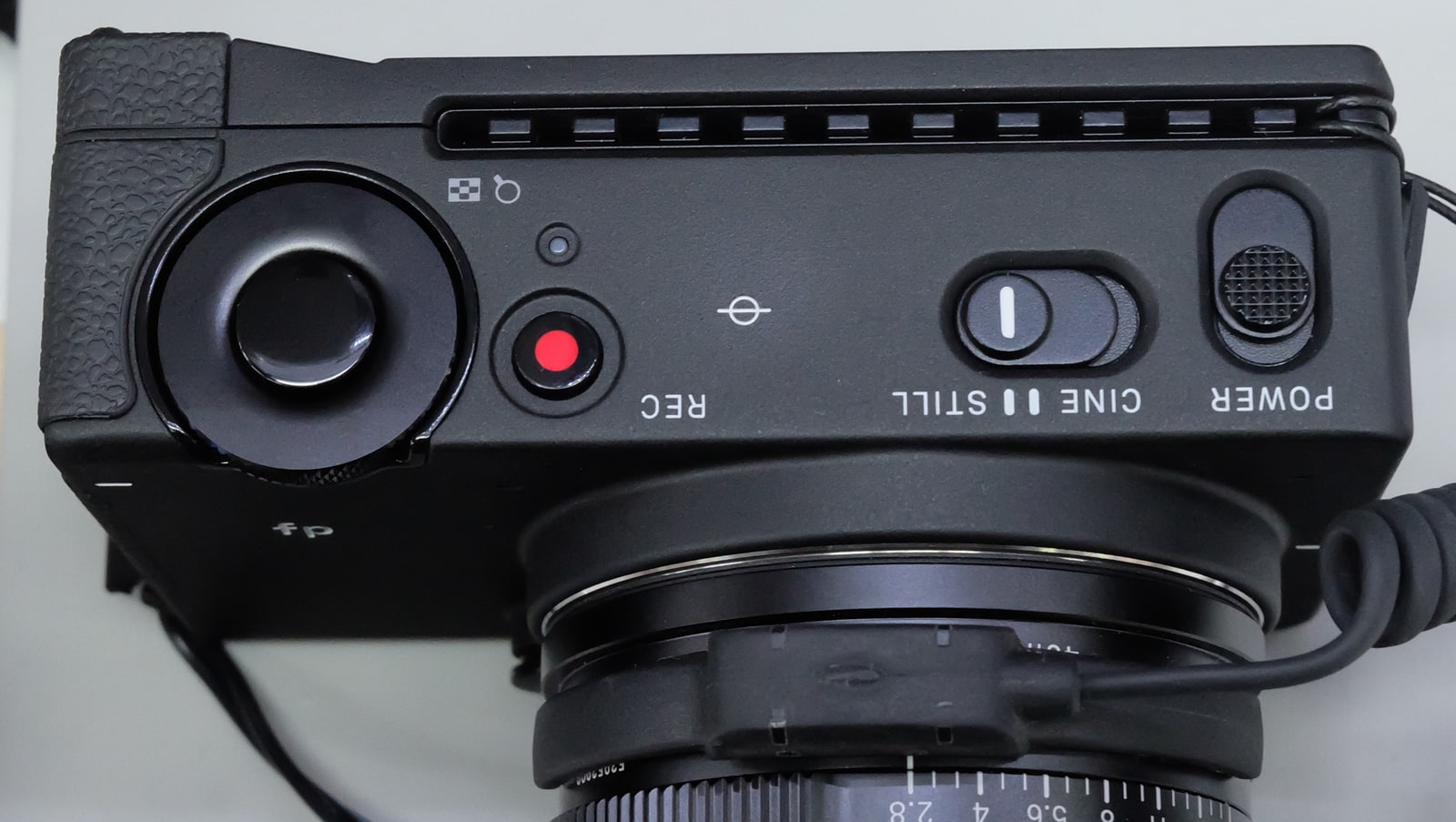
That is the value of making the rig list first. It turns an interesting announcement into an answerable purchasing decision, and it gives a retailer or rental house questions more useful than whether the camera is “good.” The archive photograph shows the original Sigma fp, not the FP2; it supplies context for the earlier modular design and is not evidence of the new camera’s construction, image quality or performance.
Source notes: 1. Original editorial interpretation and hypothetical examples are identified in the text.
Sources & Methods
Documentation-based In Depth guide prepared October 26, 2026, using Sigma launch and specification pages, current editing references, Nikon and Panasonic documentation and an attributed early TechRadar hands-on. Announcement and scheduled availability are distinguished. No Lumacta camera handling, footage import, lab measurement, retailer-stock verification or expert interview is claimed. Crop geometry, capacity arithmetic, budget allowances and the acceptance worksheet are original hypothetical editorial aids, not measurements. Archive photography is identified separately.
- Sigma FP2 launch schedule — Primary announcement; October 23, 2026
- Sigma FP2 complete specifications and footnotes — Primary specifications; read October 26, 2026
- Sigma America FP2 launch prices and accessory conditions — Primary US announcement; October 23, 2026
- Timothy Coleman, early Sigma FP2 hands-on — Independent early hands-on; October 23, 2026; not yet rated
- Apple ProRes RAW acquisition and data-rate explanation — Primary codec reference; read October 26, 2026
- DaVinci Resolve 21 supported codecs — Primary compatibility table; September 2026
- Nikon ZR recording capabilities — Primary manufacturer reference; read October 26, 2026
- Panasonic S9 operating instructions — Primary recording-mode table; pages 127–130
- Panasonic S9 stabilization specification — Primary manufacturer reference; read October 26, 2026
- Adobe ProRes RAW support requirements — Primary editor reference; updated September 30, 2026