
One camera can have two very different scan times
A camera can give you more room to grade a difficult exposure and make the geometry of a fast pan harder to live with. Those two effects can come from the same menu option. Panasonic introduced the Lumix SHX1 on November 17, 2026, and said that Dynamic Range Boost increases rolling-shutter distortion. It planned phased availability from December.
CineD put a number on the difference. In its full-frame 5.8K ProRes RAW test, the lab measured 12.2 milliseconds with the boost off and 26.2 milliseconds with it on. The unit was a preproduction sample supplied by Panasonic. The lab said Panasonic described its imaging pipeline as final. The published measurements describe that camera and recording mode. A production body running the firmware you intend to use remains the place to verify the result for a paid shoot.
The choice makes sense when you start with the scene. For an interview beside a bright window, the camera might barely move. For a handheld follow shot past rows of windows, the background moves across the sensor even if the person stays centered. You can shoot both with the same body, lens and framing style and make a different choice about the recording mode each time.
A short exposure can still produce a bent frame
A rolling electronic shutter gives successive rows their exposure windows at different times. Each row can spend the same amount of time collecting light. The rows near the end of the scan see the scene a little later than the ones at the beginning. Basler's sensor documentation separates the individual row exposure from the total readout time. It also explains how a global shutter can finish every exposure together and transfer the captured information afterward.
Imagine a locked camera pointed at a bright upright line that moves steadily sideways. As the camera samples successive rows, each row finds the line a little farther across the image. Viewed together, those samples form a diagonal. Shortening each row's exposure can make the edge sharper while leaving the tilt visible. Motion blur and geometric skew are two separate things to look for when you review the clip.
For a rough sense of scale, imagine an edge moving at 1,000 pixels per second. Across a frame with a 12-millisecond scan it would move about 12 pixels between the earliest and latest sampled rows. Across 26 milliseconds it would move about 26 pixels. That's an illustration with constant image-plane speed and a full-height edge. Real pans change speed, subject depth changes apparent motion, and a short edge spans only part of the scan. The example gives you a way to reason about footage without turning a lab number into a universal pass mark.
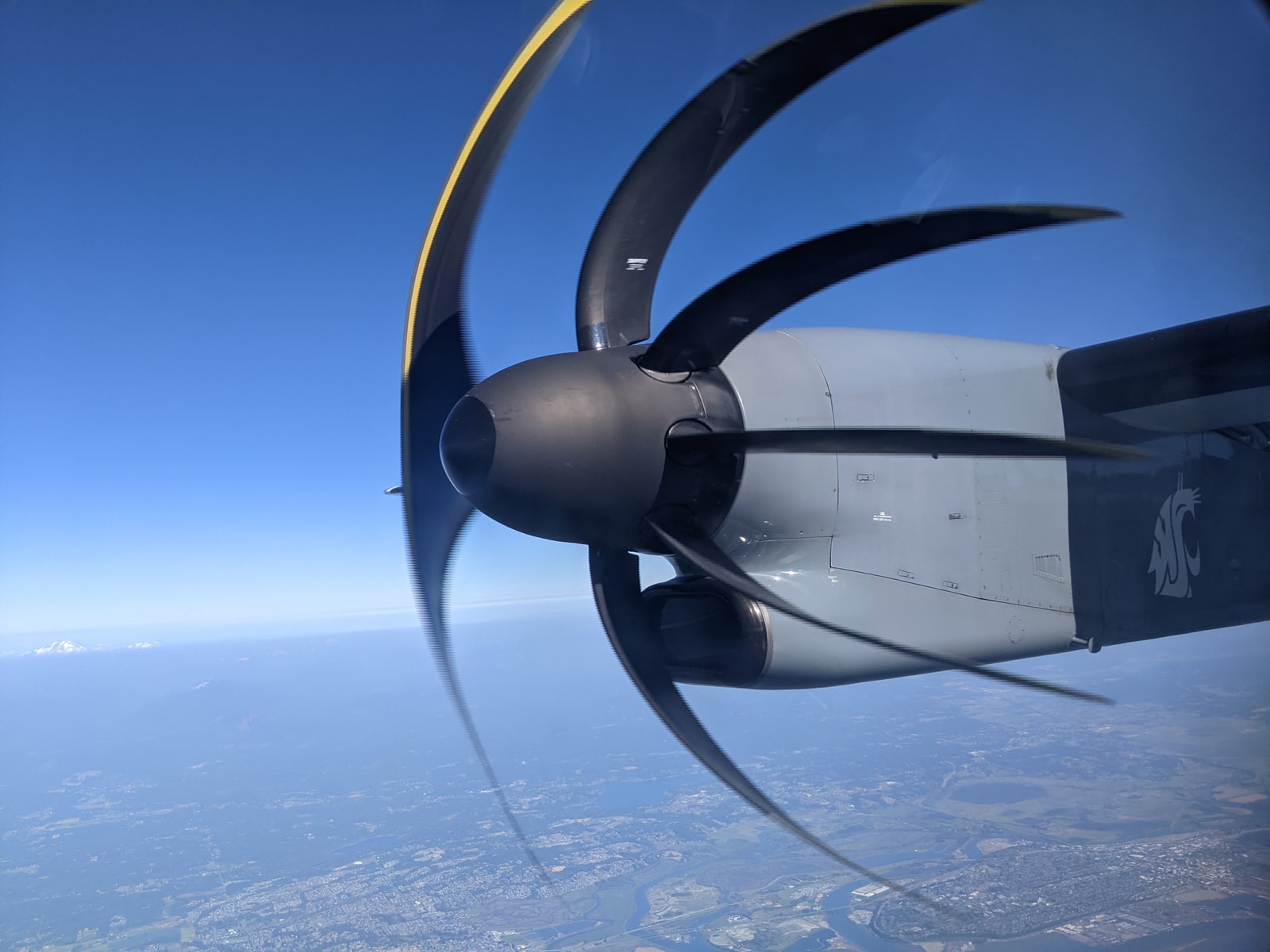
The archive photograph above makes the distinction visible in a different medium. The photographer's Pixel 3 recorded a Dash 8 propeller in July 2021. The source file lists an exposure of about a third of a millisecond, yet the blade shapes curve dramatically. Each part of the photo captured the fast-spinning propeller at a slightly different phase. It's an illustration of the effect in a still photograph. The file gives us no measurement of that camera's scan time in video.
Source notes: 3.
Read the mode before reading the number
A spec sheet might tell you that a body offers both open-gate and widescreen recording. A useful measurement tells you which region of the sensor the camera samples, the recording format and the frame rate. Open gate is especially useful when an editor needs room to frame the same take for both a horizontal sequence and a vertical one. That flexibility can come with a longer scan if the mode uses more rows.
DPReview measured the Panasonic S5 II at 25.5 milliseconds in open gate, 21.6 milliseconds in full-width UHD at 24 fps and 14.4 milliseconds in APS-C crop UHD at 60 fps. CineD reported close results in comparable modes and also recorded the same 14.3 milliseconds in the APS-C UHD modes it tried at 24 and 60 fps. Taken together, those observations show why a camera's playback cadence is an unreliable shortcut for scan time. You also need to know what else changed with that cadence.
A crop can buy you a faster scan in some cameras. It also changes the field of view with the same lens. If you step back or switch to a wider lens to match the original framing, you may have changed the perspective, working distance or the way you move with the subject. Judge the faster mode on the shot it would actually produce. If you chose open gate to protect two deliverables from a single take, rehearse both crops before giving up the extra picture area.
Many bench tests use light pulses as timing marks. CineD's strobe creates bright and dark bands while successive rows are sampled. A known pulse rate lets the lab estimate the time spanned by the image. That isolates one property of a camera mode. Compare the video settings in the test table, and allow for differences in method before reading much into tenths of a millisecond across labs. Use the ranking to pick a shortlist of modes and the shoot to decide which one works.
Choose a solution for the defect you can see
A faster rolling scan can be enough if the practical problem is a mild tilt during a repeatable pan. You may already have a suitable mode on the camera. Test a smaller scan area, a different quality mode or a setting that uses a different sensor pipeline, whichever applies to your model. Compare the usable clips alongside changes to framing, noise, detail, recording media and the grade. A mode that saves the geometry can still complicate a delivery when it changes several of those at once.
If the camera movement is causing the problem, you can sometimes keep the original mode and change the shot. Try a slower pan, a wider frame or blocking that reduces lateral movement. A stable rig reduces shake from the operator, which can make handheld wobble less obvious. It cannot make the rows of a fast-moving subject share the same exposure window. If the problem is on the subject itself, give the camera a representative subject in your test.
A global shutter is a different option. Simultaneous exposure removes the row offset that causes this particular kind of skew. Sony’s engineers describe the challenges of building a full-frame global-shutter sensor for the Alpha 9 III. CineD found more noise in the Alpha 9 III’s cropped Super 35 test than in its full-frame test. For a purchase, compare actual footage at the light levels and exposure choices where you work. Global exposure can solve a motion constraint while cost, codecs, rigging and low-light performance still shape the decision.
Lighting artifacts deserve their own check. A fixture whose output pulses during a scan may leave bands because rows see different brightness at different times. A global exposure gives rows the same window, and changing exposure time can also change how the camera integrates the pulse. A clip can still fluctuate from frame to frame when the light and the recording slip out of step. Test the actual fixture and dimming level on location. A daylight pan tells you about geometry under daylight and leaves the venue lights untested.
Adobe describes Premiere’s rolling-shutter repair as a tool for wobble and skew caused by camera movement. Give them a separate trial when the shot matters. A software correction has to estimate motion from the captured image. Independently moving objects, propellers and depth changes make one correction harder to apply across the frame. Review edges and moving subjects after stabilization and export so you can see what the delivery will look like.
Take the test to the shot you are paying for
Pick two short clips. For the first, pan past upright doorframes or posts at the fastest speed you genuinely expect to use. Hold the lens, framing and movement as steady across takes as possible. For the second, keep the camera fixed and let a representative subject cross the frame. A cyclist or a performer moving across a rehearsal space is enough to show whether the motion you care about changes shape. Shoot under the fixtures you expect to use if lighting is part of the concern.
Log the body and firmware, sensor area, resolution, frame rate, exposure time, stabilization and any dynamic-range setting. Start with the mode you intend to deliver. Change one setting at a time where the camera allows it. If a different mode forces a crop, keep one pass with the same lens to reveal the framing change and another with the framing you would actually use. That way a narrower view cannot hide the cost of switching modes.
During review, first play the footage at its intended speed and size. Look for edges that lean during the movement, then straighten when the camera stops. Inspect moving subjects independently of the background. Next step through a few frames to see whether the problem is tilt, softness from motion blur, or bands that move with the lighting. Run the same stabilization and crop you plan to use in the final edit. Review the final framing, since a vertical social extract can call attention to an edge that was easy to overlook in a wider cut.
Make the acceptance test specific. An interview setup passes if its real movement and light leave clean footage in the preferred grade. A sports setup passes if the fast movement stays believable on the delivered screen. An effects plate may need geometry consistent enough for tracking or compositing. Those jobs have different thresholds. Pick the mode that meets the strictest requirement of the shot and write it into the production notes while you still have the comparison clips.
Decide whether the body needs to change
For mostly deliberate camera movement, first look for a mode that preserves the framing and color workflow you already need. For a mixed schedule, you may prefer one setup for static coverage and a faster scan for motion. Label those setups clearly so a camera operator can change modes without guessing which color or crop compromises come with the switch.
If fast lateral motion, rotating subjects or camera tracking are central to almost every deliverable, put fast readout or global exposure high on the rental shortlist. Compare on the lens you would use and in light you can reproduce. Global shutter is most valuable when eliminating the geometry problem saves a shot, a production workaround or post-production time. A camera with a shorter rolling scan can be the better overall fit when it clears the test and gives you other recording characteristics your work depends on.
The next useful number for the SHX1 will be a measurement from a shipping body in the exact mode a crew plans to use. In the meantime, the published boost-on and boost-off comparison already suggests a sensible question for any camera test. Which mode can hold the shot together at the speed you actually film? Keep the answer beside your codec and frame-rate notes.
Sources & Methods
We compared manufacturer documentation with independent timing and image tests. The displacement example and suggested field test are editorial analysis.
- Panasonic — SHX1 announcement and launch schedule
- CineD SHX1 test — Preproduction readout measurements
- Basler shutter documentation — Row exposure timing and global capture
- DPReview S5 II review — Independent open-gate, UHD and crop timings
- CineD S5 II test — Corroborating sensor-mode measurements and strobe method
- Sony engineering account — Full-frame global-shutter design
- CineD Alpha 9 III test — Noise in the tested crop and full-frame modes
- Adobe Premiere documentation — Rolling-shutter repair effect